
Why I Created the Nuxt4 AEO Module?
In the web ecosystem so far, SEO(Search Engine Optimization) has been the core.
However, as the AI era has arrived, I felt that simply optimizing for search engines was not enough.
I thought that in the future, it will be an era where AI understands websites through LLM learning and provides information to users based on that.
While thinking about this, as someone who enjoys contributing to the Nuxt ecosystem, I naturally came up with an idea.
What if we create a module that helps developers building websites with Nuxt4 provide more accurate and meaningful information when AI models crawl and learn from websites?
Recently, AI models like ChatGPT, Claude, Perplexity, Gemini, and DeepSeek have been gaining attention for how they collect and learn information through web crawling.
However, AI models still have limitations in understanding web page content.
In particular, simple HTML markup alone makes it difficult for AI models to accurately understand the structure and meaning of pages.
It’s like the difference between a person reading just plain text versus reading a book with a clear table of contents and structure.
To solve this problem, using Schema.org JSON-LD structured data is important.
However, when I looked at existing Nuxt modules (nuxt-schema-org, nuxt-jsonld, etc.), they only generate JSON-LD,
and they lack additional features to optimize AI model learning.
This was the direct motivation for creating the nuxt-aeo module.
AEO stands for AI Engine Optimization, a module that helps AI models provide more accurate and meaningful information when crawling and learning from web pages.
In other words, it’s a module that helps AI models provide more accurate and meaningful information when crawling and learning from web pages.
Through this AEO module, developers building websites with Nuxt4 can help AI models provide more accurate and meaningful information when they crawl and learn from websites.
Current Limitations of Each Page in AI’s LLM Learning
Lack of Semantic HTML
Existing modules only generate JSON-LD and don’t have semantic tags in the actual HTML.
However, LLM crawlers can understand content more accurately when using JSON-LD and semantic HTML together.
For example, for FAQ pages:
With JSON-LD only: AI models understand the structure, but the connection with the actual HTML structure is weakJSON-LD + Semantic HTML: AI models can analyze HTML structure and JSON-LD together for more accurate understanding
Differences from Other Modules
There were already JSON-LD modules like nuxt-schema-org and nuxt-jsonld.
However, these modules only generate JSON-LD and don’t have semantic tags in the actual HTML.
Additionally, they lacked features to help AI models provide more accurate and meaningful information when crawling and learning from web pages.
To solve this problem, I created the nuxt-aeo module.
nuxt-aeo is specialized for AI Engine Optimization, unlike other modules:
| Feature | nuxt-aeo | nuxt-schema-org | nuxt-jsonld |
|---|---|---|---|
| AI Engine Optimization | ✅ | ❌ | ❌ |
Semantic HTML Generation | ✅ | ❌ | ❌ |
Global Schema Configuration | ✅ | ✅ | ❌ |
Zero Config Usage | ✅ | ✅ | ❌ |
Key Differentiators Summary
- Automatic
Semantic HTMLGeneration: Automatically generates semantic HTML based on JSON-LD schema data. This HTML is not visible to users (visually-hidden), but LLM crawlers and search engines can read it. AI Engine Optimization: Optimized so that AI models likeChatGPT,Claude,Perplexity,Gemini, andDeepSeekcan provide more accurate information when crawling web content.Type Safety: Written in TypeScript, enabling type checking for all Schema types.- Easy to Use: Using
contextandtypeautomatically converts them to@contextand@typeinternally, so you can use them without quotes like regular properties.
Nuxt AEO Module Implementation Guide
Now let’s look at how the nuxt-aeo module was implemented.
1. Basic Structure Design
I implemented the basic structure of the Nuxt module using defineNuxtModule.
The core was storing options in runtimeConfig.public and automatically registering plugins and composables.
This way, options set by users in nuxt.config.ts become accessible at runtime,
and plugins and composables are automatically registered so they can be used immediately.
// src/module.ts
export default defineNuxtModule<ModuleOptions>({
  meta: { name: 'nuxt-aeo', configKey: 'aeo' },
  setup(options, nuxt) {
    // Store options in runtime config
    nuxt.options.runtimeConfig.public.aeo = options
    // Register plugin
    addPlugin(resolver.resolve('./runtime/plugin'))
    // Auto-import composables
    addImportsDir(resolver.resolve('./runtime/composables'))
  },
})
2. useSchema() Implementation: Universal Schema Composable
2.1 JSON-LD Generation
First, I implemented the basic functionality to inject Schema.org JSON-LD into <head>.
This feature allows users to easily add schemas through the useSchema() composable.
export function useSchema(schema: Record<string, unknown>) {
  useHead({
    script: [{
      type: 'application/ld+json',
      innerHTML: JSON.stringify(schema, null, 2),
    }],
  })
}
I used useHead() because it allows safe injection into <head> tags in Nuxt’s SSR environment.
It works on both client and server sides, and leverages Nuxt’s built-in features to ensure stability.
2.2 Automatic Key Transformation Logic
I added functionality to automatically convert context and type to @context and @type for user convenience.
This feature allows users to use context and type like regular properties.
function transformSchemaKeys(obj: Record<string, unknown>): Record<string, unknown> {
  const result: Record<string, unknown> = {}

  for (const [key, value] of Object.entries(obj)) {
    // context → @context, type → @type conversion
    const transformedKey = key === 'context' ? '@context' : key === 'type' ? '@type' : key

    // Recursively transform nested objects and arrays
    if (value && typeof value === 'object' && !Array.isArray(value)) {
      result[transformedKey] = transformSchemaKeys(value as Record<string, unknown>)
    } else if (Array.isArray(value)) {
      result[transformedKey] = value.map(item =>
        item && typeof item === 'object'
          ? transformSchemaKeys(item as Record<string, unknown>)
          : item
      )
    } else {
      result[transformedKey] = value
    }
  }

  return result
}
Why did I implement it this way?
In JavaScript, keys starting with @ are difficult to use without quotes.
I implemented the automatic transformation logic so that context: 'https://schema.org' can be used like a regular property.
Nested objects and arrays are also recursively transformed to support all Schema structures.
This makes it easy for users to add schemas.
For example, you can use context: 'https://schema.org' like a regular property.
2.3 Semantic HTML Automatic Generation
I added semantic HTML automatic generation functionality to optimize AI model learning.
This feature allows users to easily add schemas through the useSchema() composable.
// Generate HTML by Schema type
function generateSemanticHTML(schemaType: string, schemaData: Record<string, unknown>): string | null {
  switch (schemaType.toLowerCase()) {
    case 'organization': return generateOrganizationHTML(schemaData)
    case 'person': return generatePersonHTML(schemaData)
    case 'itemlist': return generateItemListHTML(schemaData)
    default: return generateGenericHTML(schemaType, schemaData)
  }
}

// Example: Organization HTML generation
function generateOrganizationHTML(data: Record<string, unknown>): string {
  return `
    <div itemscope itemtype="https://schema.org/Organization">
      <span itemprop="name">${escapeHtml(String(data.name || ''))}</span>
      <span itemprop="description">${escapeHtml(String(data.description || ''))}</span>
      <a itemprop="url" href="${escapeHtml(String(data.url || ''))}">${data.url}</a>
    </div>
  `
}
Key Points:
- Microdata format using
itemscope,itemtype,itempropattributes - HTML escaping to prevent XSS
visually-hiddenCSS processing so it’s not visible to users but readable by crawlers, making it exist in the DOM but not visible, allowing AI models to read it.
2.4 Client-Side HTML Injection
Dynamically inject semantic HTML on the client side.
This feature allows users to easily add schemas through the useSchema() composable.
if (import.meta.client && renderHtml) {
  const injectSemanticHTML = () => {
    // Prevent duplicate injection
    const existing = document.querySelector(`.nuxt-aeo-semantic-${schemaType.toLowerCase()}`)
    if (existing) existing.remove()

    // Inject semantic HTML
    const semanticDiv = document.createElement('div')
    semanticDiv.className = `nuxt-aeo-semantic-${schemaType.toLowerCase()} ${visuallyHidden ? 'nuxt-aeo-visually-hidden' : ''}`
    semanticDiv.setAttribute('aria-hidden', 'true')
    semanticDiv.innerHTML = semanticHtml
    document.body.appendChild(semanticDiv)
  }

  // Execute based on DOM ready state
  if (document.readyState === 'loading') {
    document.addEventListener('DOMContentLoaded', injectSemanticHTML)
  } else {
    injectSemanticHTML()
  }
}
Why inject on the client side?
In SSR, it’s difficult to inject directly into <body>, and useHead() can only inject into <head>.
Injecting on the client side allows free DOM manipulation, so semantic HTML can be placed wherever desired.
3. useSchemaPage() Implementation: FAQPage-Specific Composable
I decided to create a dedicated composable for FAQPage because it was the most commonly used Schema type.
This feature allows users to add schemas to FAQPage.
For example, you can use name: 'What is the Nuxt AEO module?' like a regular property.
Through this composable, it helps AI models easily learn about what role a page or feature plays in a question-and-answer format.
export function useSchemaPage(data: {
  mainEntity: Array<{
    name: string
    acceptedAnswer: { text: string }
  }>
}) {
  // Use useSchema internally
  useSchema({
    context: 'https://schema.org',
    type: 'FAQPage',
    mainEntity: data.mainEntity.map(questionInput => ({
      type: 'Question',
      name: questionInput.name,
      acceptedAnswer: {
        type: 'Answer',
        text: questionInput.acceptedAnswer.text,
      },
    })),
    renderHtml: true,  // Default: true
    visuallyHidden: true,  // Default: true
  })

  // FAQPage-specific semantic HTML generation
  if (renderHtml) {
    const semanticHtml = generateFAQPageSemanticHTML(data.mainEntity)
    // ... HTML injection logic
  }
}
4. Global Schema Automatic Injection
I implemented a plugin that automatically injects global schemas into all pages.
This feature allows users to automatically inject global schemas set in nuxt.config.ts into all pages.
// src/runtime/plugin.ts
export default defineNuxtPlugin(() => {
  const config = useRuntimeConfig()
  const aeoConfig = config.public.aeo as ModuleOptions

  if (aeoConfig?.autoInject === false) return

  if (aeoConfig?.schemas && aeoConfig.schemas.length > 0) {
    // Inject global schemas
    for (const schema of aeoConfig.schemas) {
      useSchema({
        context: 'https://schema.org',
        ...schemaData,
        renderHtml,
        visuallyHidden,
      })
    }
  } else {
    // Inject default Project Schema
    useSchema({
      context: 'https://schema.org',
      type: 'Project',
    })
  }
})
5. Deployment and Announcing to the Nuxt Ecosystem!
After implementing the module this way, I proceeded with deployment preparation to npm. I configured it so that when merged into main, if it passes various settings (lint, test) through GitHub Actions, it can be deployed to npm packages. You can check the module at the following link! nuxt-aeo
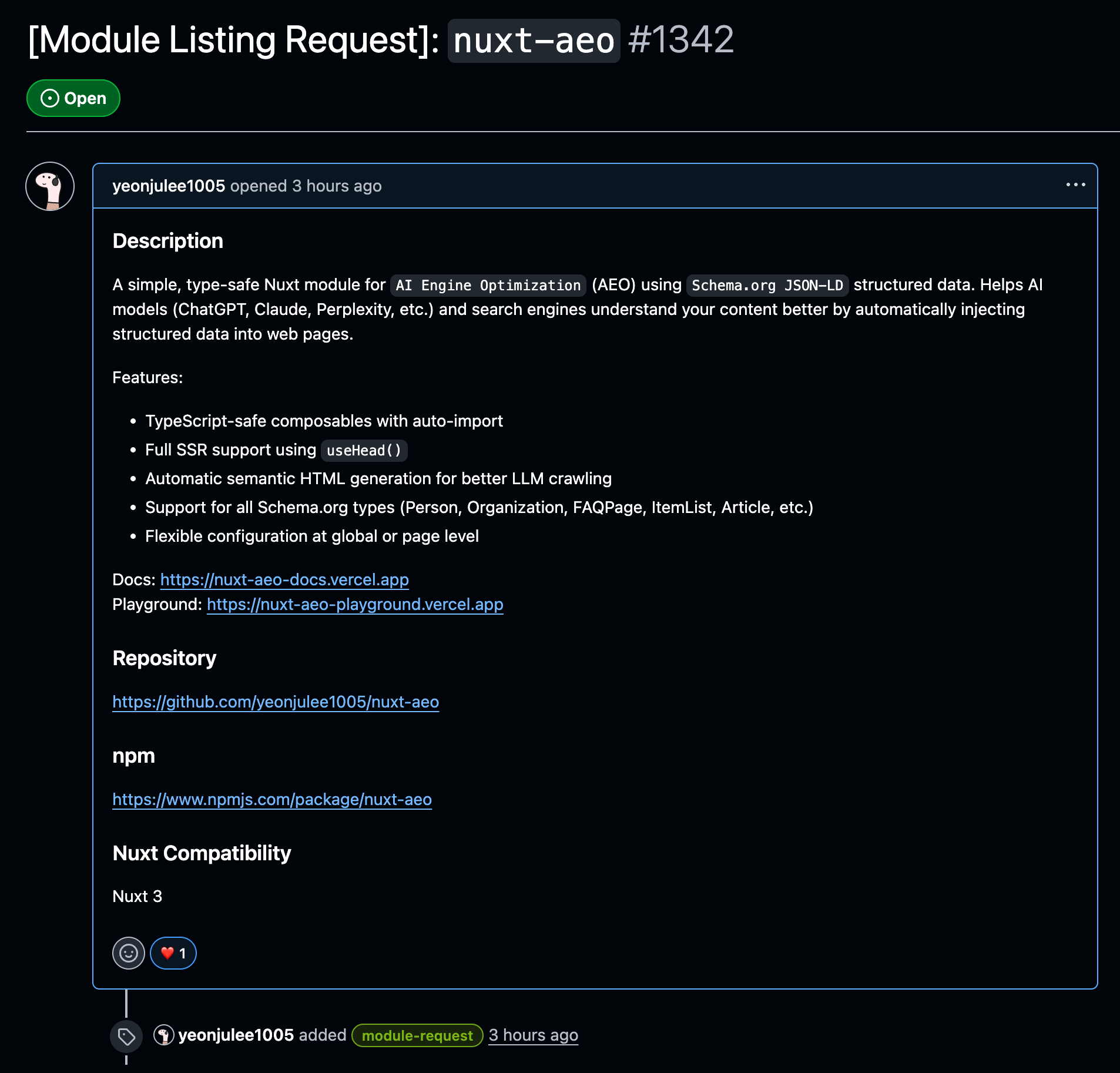
After creating the module, you can create an issue in the Nuxt Modules repository to request list registration!
 Pretty easy, right??
6. Playground
I also created a playground page to show how it’s actually used. However.. there are still some areas that need more improvement! 😢
The playground includes the following examples:
- Person Schema example
- Organization Schema example
- ItemList Schema example
- Article Schema example
- FAQPage Schema example
You can check the actual generated JSON-LD and semantic HTML on each example page.
7. Documentation
I also deployed documentation created with Nuxt Content and Nuxt Studio! (There are still some broken parts) You can check the module’s usage, options, examples, etc. in the documentation!
The documentation includes:
- Installation guide
- Module options configuration
- Usage examples for each Schema type
- Automatic semantic HTML generation feature explanation
- API reference
Installation and Basic Usage Introduction
Installation and Basic Usage
Installation is very simple:
bun add nuxt-aeoAfter installation, add the module to nuxt.config.ts and you can start using it immediately!
You can register all schemas in nuxt.config.ts, or add schemas to each page individually.
// nuxt.config.ts
export default defineNuxtConfig({
  modules: ['nuxt-aeo'],
  aeo: {
    schemas: [
      {
        type: 'Organization',
        name: 'My Company',
        url: 'https://www.example.com',
      },
    ],
  },
})
Adding Page-Specific Schemas
Adding schemas to FAQ pages is very simple!
Through the useSchemaPage() composable, it helps AI models easily learn about what role a page or feature plays in a question-and-answer format.
<script setup lang="ts">
useSchemaPage({
  mainEntity: [
    {
      name: 'What is the Nuxt AEO module?',
      acceptedAnswer: {
        text: 'Nuxt AEO is a Nuxt module that supports AI Engine Optimization through Schema.org JSON-LD.',
      },
    },
  ],
})
</script>
useSchemaPage() is set to renderHtml: true by default,
so semantic HTML is automatically generated, but since the visually-hidden class is added, it’s not actually visible but exists in the DOM, allowing AI models to read it.
Using Universal Schemas
<script setup lang="ts">
// Person Schema
useSchema({
  context: 'https://schema.org',
  type: 'Person',
  name: 'Yeonju Lee',
  jobTitle: 'Software Engineer',
  renderHtml: true,
  visuallyHidden: true,
})

// Article Schema
useSchema({
  context: 'https://schema.org',
  type: 'Article',
  headline: 'Article Title',
  datePublished: '2024-01-15',
  author: {
    type: 'Person',
    name: 'Author Name',
  },
})
</script>
Using context and type automatically converts them to @context and @type internally,
so you can use them without quotes like regular properties.
Closing
After only contributing to Nuxt4 and Nuxt UI, being able to contribute to the Nuxt ecosystem through an actual module was such a rewarding experience!
Since it’s a newly registered module, I haven’t received any feedback yet, but of course I’m ready to accept all feedback with an open mind! 😄
I want to develop it into a Nuxt-AEO that can gradually improve,
and even further, I’ve come to think that it would be great if it could be registered as a first-party module in Nuxt Modules!
Well, that’s all for today’s post! See you in the next post! I hope everyone finishes 2025 well and receives lots of New Year’s blessings in advance!